WiFly1.4.9
Publisher Description
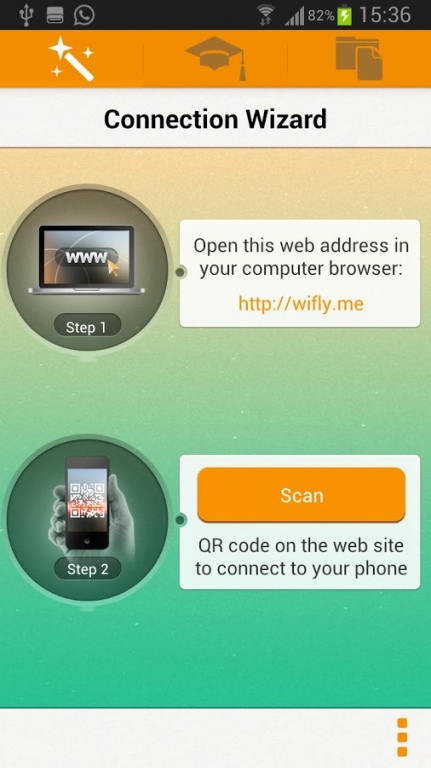
WiFly – unclouded service!
It is the best solution for transferring photos, songs, documents, movies and other files between computer and your mobile devices over wireless network.
Simply launch application on your iOS device and scan QR code from http://wifly.me to connect your phone. Drop your files into opened page and vice versa!
No cloud or internet access required - no data leaves your local network.
Both your devices must have access to the same LAN or WLAN - no additional network configurations needed.
Transferred documents can be opened with any supported App on your Android device.
Capabilities:
- Multiple uploads
- Easily Drag & Drop multiple files to WiFly
- Preview pictures in the browser
- Downloading the entire folder to your computer
- Browsing files and folders directly on mobile device
- Exchange files between mobile devices
About WiFly
The company that develops WiFly is Adinch.com. The latest version released by its developer is 1.4.9. This app was rated by 2 users of our site and has an average rating of 3.8.
To install WiFly on your Android device, just click the green Continue To App button above to start the installation process. The app is listed on our website since 2014-01-16 and was downloaded 1,146 times. We have already checked if the download link is safe, however for your own protection we recommend that you scan the downloaded app with your antivirus. Your antivirus may detect the WiFly as malware as malware if the download link to ru.onlinepp.wifly is broken.
How to install WiFly on your Android device:
- Click on the Continue To App button on our website. This will redirect you to Google Play.
- Once the WiFly is shown in the Google Play listing of your Android device, you can start its download and installation. Tap on the Install button located below the search bar and to the right of the app icon.
- A pop-up window with the permissions required by WiFly will be shown. Click on Accept to continue the process.
- WiFly will be downloaded onto your device, displaying a progress. Once the download completes, the installation will start and you'll get a notification after the installation is finished.
Program Details
System requirements
Download information
Pricing
Version History
version 1.4.9
posted on 2014-01-16
v1.4,- add android 2.3.3 support,- bugfix,v1.3.8,- add audio files support playback
version 1.4.3
posted on 2013-06-13
Several fixes and updates
